Google serves trillions of searches every year and if your website ranks well, you’re almost guaranteed sincere traffic. But, Google’s guidelines are extensive and tricky. It can be difficult if you’re learning about SEO for the first time.
Search Engine Optimization has become essential for all websites. Today, most websites get traffic from search engines. And SEO is your best bet at attracting some of that organic traffic.
It has become an important part of any website’s digital marketing efforts. So it would make sense if you allocate a healthy budget for SEO efforts. It’ll help you attract new visitors and potential customers to your website.
We figured we’d help out website owners and startups with a one-stop solution to understanding SEO tasks. It lead us to compile this complete SEO checklist, in which we’ve included all the tasks and aspects of your SEO efforts.
THE MAIN CATEGORIES COVERED IN THIS GUIDE INCLUDE:
- How to use this Checklist?
- Basic SEO Checklist
- Keyword Research Checklist
- Technical SEO Checklist
- On-page SEO Checklist
- Off-page SEO Checklist
- Final Words
HOW TO USE THIS CHECKLIST?
We’ve divided this checklist into sections that cover the main focus areas of SEO. These include the basics, keyword research, technical SEO, on-page SEO, and off-page SEO factors.
Your site might already cover a lot of the points that we mention. And if it does, that’s great.
However, we also know that there is always a scope of improvement. We are confident that you will find at least some best-practices that you have overlooked.
Also, some points and tasks might not be relevant to you, and that is fine. You can skip over such points.
Work through this checklist, reference it against your site, resolve issues, and maximize opportunities where you can. SEO success is not guaranteed by simply following a checklist. To outrank your competitors, you need to make sure you are at least covering most of these points.
BASIC SEO CHECKLIST
1. SET UP FREE REPORTING PLATFORMS
Start off by ensuring that you have Google Search Console, Bing Webmaster Tools, Google Analytics, and Google Tag Manager tied to your site.
Google Search Console is an important tool that provides you with invaluable insights into your website’s performance as well as a wealth of data. You can use this information to grow your site’s organic visibility and traffic.
Google Analytics is a free marketing analytics tool. It allows you to view data and insights about how many people are visiting your website, who they are, and how they are engaging with it. It provides a detailed report on all aspects of your website usage.
2. INSTALL SEO PLUGIN (IF YOU’RE USING WORDPRESS)
WordPress powers over 37% of the web. So, chances are that your website is built on WordPress as well.
If that is the case, you should install and configure an SEO plugin that provides the functionality and features that you need to properly optimize your site.
You can check out the Yoast SEO plugin and the RankMath SEO plugin for your WordPress website. Yoast SEO is one of the most popular SEO plugins on WordPress.

3. XML SITEMAP
A sitemap is like a table of content for your website. It is a modern way of submitting your pages to the search engines.
Most website platforms have plugins/add-ons that will create a dynamic sitemap that stays in sync with the pages on your site. In WordPress, you can use the Yoast SEO or the RankMath SEO plugin to generate XML sitemaps of your website.
4. ROBOTS.TXT FILE
Your website’s robots.txt file tells search engine crawlers the pages and files that web crawlers can or can’t request from your site. It is used to prevent certain sections of your site from being crawled.
This file instructs the search engines about what pages or parts of the site to not index. By default, the search engines will look at all the content they can find.
Even if you don’t want to restrict the search engines from indexing any pages on your site, you must ensure that this file is accurate, it validates in Google Search Console and Bing Webmaster Tools, and doesn’t block important content from being indexed.
5. ENSURE THAT YOUR SITE CAN BE INDEXED BY SEARCH ENGINES
A lot of times, you might not see your website in Google search because it is not being indexed by search engines at all.
In fact, you’d be surprised at how often a sudden de-indexing of a site is the result of developers accidentally leaving ‘noindex’ tags in code when moving it from a staging environment to a live one.
You can use the SEMrush site audit tool or the UberSuggest Site Audit tool to ensure that your website can actually be crawled and indexed.
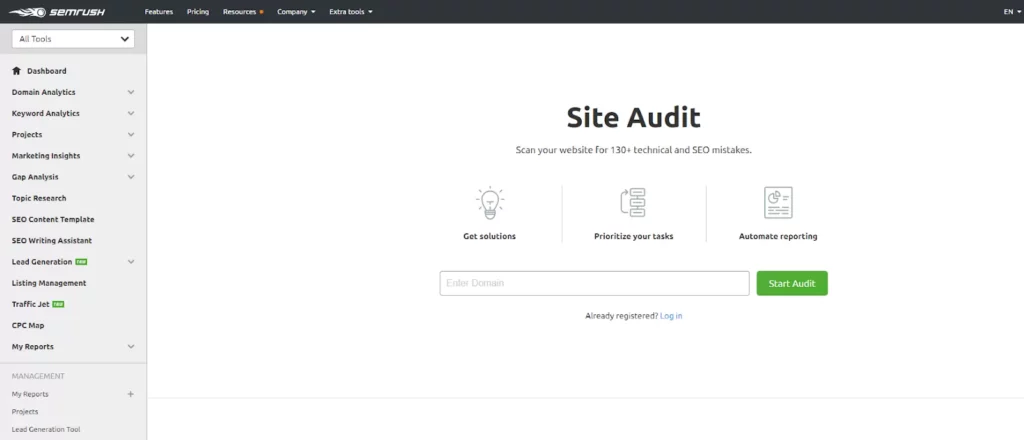
Double-checking this can ensure that your SEO efforts are not wasted by search engine crawlers not being able to crawl and index your website.
KEYWORD RESEARCH CHECKLIST
Keyword research is the process of discovering search terms that search engine users type into Google to find information related to your business or industry.
Without good keyword research, you are not going to rank for the right terms. And if you’re not ranking for the right words, your visitors won’t convert at the rate you want.
Here is a checklist of the important keyword research tasks you need to perform to ensure success from your SEO efforts.
1. IDENTIFY AND ASSESS YOUR COMPETITORS
The quickest way to get started with keyword research is to find the terms that are working for your competitors. Competitor Analysis gives you significant insight into what you need to do and where should your efforts concentrate.
Run your domain and your competitors’ domains through SimilarWeb, SEMRush Domain Overview Tool, or UberSuggest. These tools will help you know about the SEO efforts of your competitors and give you a clearer idea of where you stand and where you want to be.

2. FIND YOUR ‘PRIMARY’ KEYWORDS
Your ‘primary’ or ‘main’ keywords are the ones that’ll drive you leads, sales, and conversions. Mostly, these are high volume, high competition keywords that summarize what you have to offer. They directly relate to your business’ main offering and will be most used by potential customers to be able to reach you.
You can use tools like Google Keyword Planner, UberSuggest, or the SEMRush Keyword Overview tool. These will help you understand which keywords are best for your business and you should rank for.

3. FIND LONG-TAIL KEYWORDS
Long-tail keywords deliver a higher conversion rate despite typically having lower search volume than primary keywords.
You need to make sure that your SEO strategy targets long-tail keyword variants as well as primary keywords. You must optimize your site’s pages to ensure that they are ranking for a variety of related terms. This will also enable you to create supporting content that sits alongside your key or primary content.
Use tools like Answer The Public and Keyword Shitter to figure out all the long-tail keywords that revolve around your primary keywords.

4. KEEP YOUR KEYWORD LIST UPDATED
You know your business the best. That’s why keyword research always starts with a brainstorming session to create a seed list of potential keywords.
This list should include any terms that you know are relevant to your business. Anything that may refer to your specific company, industry, or even headquarters is a smart start to keyword research.
Also, include all the low-competition long-tail keywords that are relevant to your business. It is easy to rank for these keywords and the traffic that they get has a higher conversion potential.
Keep this list of keywords updated, along with all the pages you’ve created targeting each keyword and all such other efforts that you’ve made to rank for each keyword.
Such a list will give you a good overview of your keyword strategy. You can also use tools like SEMRush or Ahrefs or UberSuggest to organize your keywords research efforts.
TECHNICAL SEO CHECKLIST
A technical SEO checklist can seem intimidating, especially if the technical side of SEO is new territory for you. Technical SEO, however, is essential. That’s why you must review and follow this basic SEO checklist for technical SEO.
1. HTTPS SSL
Having a secure site is extremely important. If your website doesn’t have an SSL (Secure Sockets Layer) certificate, you may lose users before they even get to your site when they see a security warning in their browsers.
Not having HTTPS secure connection is a surefire way to lose some visitors and conversions. No one wants to provide their confidential information on a website that is not secure. So don’t expect many conversions if you have not applied an SSL certificate to your website to make it secure.
2. DOMAINS
If you own more than just your primary domain name, make sure you know what all of your additional domains are doing. If they not in use, that’s fine. Also, different domain versions of your site should point to a single one so that google indexes only one version of your website.
If they redirect to your website, check to ensure that they 301 redirect to it. You should quickly check this to confirm and never overlook this. It can cause issues with duplicate content and confusion over which domain name is the real one.
3. FIND AND FIX CRAWL ERRORS
You can quickly identify any crawl errors that exist through Google Search Console.
Open your Google Search Console, head to the coverage report, and you will see both errors and excluded pages. You will also see those with warnings and those which are valid.
Take the time to resolve any errors that you find, and explore the cause of excluded URLs in more detail (in many cases, there is a reason why this is happening that you need to resolve; from 404 errors to incorrectly canonicalized pages).
4. WEBSITE ARCHITECTURE
The more hierarchy and structure you can build into the navigation and sections of your site, the better. This will benefit users & search engines and present organized topics & content. Getting your directory structure and URLs to match the literal page and file structure of content on the site is a good goal to have.
Stepping back and mapping out your site structure or sitemap is a great starting point. It forces you to think about the content, how you prioritize certain aspects of your site, and how you want to funnel your users through it.
5. WEBSITE SPEED AND PERFORMANCE
Google has recently confirmed an upcoming page experience update for 2021. It is set to place an even greater focus upon user experience as a ranking factor than is currently the case.
So your website must function smoothly and perform optimally at all times. Look for ways to minimize the use of JavaScript and heavy loading pieces of code in your pages and find ways to cache or load elements externally.
You can use tools like Google PageSpeed Insights, GTMetrix, or Pingdom to analyze your website’s speed and performance.
If you need more help with speeding up your website, you can get in touch with us. At W3SpeedUp, we are website performance and speed optimization specialists.
6. ENSURE THAT YOUR SITE IS MOBILE-FRIENDLY
Since over half the searches are made through mobile devices, it’s a given that your site has to be mobile-friendly. However, just because you built your site in a mobile framework like responsive design does not mean it corresponds in real-time. Test it out and make sure that it actually validates.
Be sure to run it through Google’s Mobile-friendly test. Also, do as much user experience and quality assurance testing as possible to make sure it truly works for your users on all devices.

7. 404 PAGES
You must not forget to create a custom 404 page and add helpful information on it. You don’t want to lose your website visitors by having a default browser error come up.
So, you should build a 404 page that includes navigation, helpful links, site search functionality, and contact details.
8. FIX BROKEN INTERNAL AND OUTBOUND LINKS
Broken links are another indicator of bad user experience. No one wants to click a link and discover that it doesn’t lead them to the page they were expecting.
A list of broken internal and outbound links can be found in your Site Audit report in SEMRush or UberSuggest. You should fix the identified issues either by updating the target URL or removing the link.
ON-PAGE SEO CHECKLIST
Without a great on-page experience and great content, you will struggle to rank your site and increase your organic traffic. With so much competition, you must ensure that you are taking every possible step to outrank other competitor blogs for important search terms.
Let’s jump into the on-page SEO Checklist for your website.
1. CONTENT
In today’s world, content is king. Good content can not only create your brand recognition but also instill confidence in your potential customers. High-quality content that helps your visitors is valued by them. Even search engines like good content that is genuinely informative, is presented nicely and is unplagiarized.
Content is also necessary to show relevancy. Well-researched content that resonates with users and is clear to the search engines is a win-win situation for you.
2. KEYWORDS AND TOPICS
If you haven’t done keyword research, you’ll need to take some time to learn what topics and phrases your audience will use to find your website.
Remember that the days of stuffing terms and keywords into pages are long gone. You have to use proper SEO tools, analyze competitors, and research keywords before you can even think about search engine rankings. Your keyword research will determine the performance of your content and website.
3. URL
A URL is the first element of a page. But, it is sometimes overlooked. Search engines can index ugly, unorganized URLs just fine.
However, the URL is an opportunity to present a clean directory structure that includes keywords and context as to what the page is about. Customize your website’s URL paths to present a more organized website structure and navigation.
4. TITLE TAGS
The title tag alone will not do much for you. However, you need to have a relevant and unique tag for each page.
Be mindful of best practices for the length of title tags.
You must ensure that all the pages and posts on your website have a title tag.
If you’re using WordPress, plugins like Yoast SEO and Rankmath will help you optimize your title tags as per SEO guidelines.
5. META DESCRIPTION
Just like the title tag, you must have a custom and relevant meta description for each page. You must make sure it is helpful to the user, contains keywords relevant to the content, and helps build context with the title tag.
You must ensure that all the pages and posts on your website have a meta description.
If you’re using WordPress, plugins like Yoast SEO and Rankmath will help you optimize your meta descriptions as per SEO guidelines.
6. HEADINGS
Headings or ‘H’ tags have to be organized as per SEO guidelines. Your headings must have relevant keywords. You must use only one H1 tag for any page or post. Also, make sure to use H2 to H6 sub-heading tags throughout your content and include keywords in them as well.
7. BODY COPY
You must never overstuff your keywords in the body. But, there should be a healthy mention of your primary as well as related keywords throughout the content.
Include your primary keyword as well as related LSI keywords. LSI (Latent Semantic Indexing) Keywords are conceptually related terms that search engines use to deeply understand the content of a web page. You can use LSI Graph to determine to keywords closely related to your primary keyword.

If you’re using WordPress, plugins like Yoast SEO and Rankmath will help you optimize your body copy as per SEO guidelines. You can use them to make the body of your pages and posts optimized to rank better in search engines.
8. IMAGE ALT ATTRIBUTES
Missing Alt text in images is one of the biggest red flags in results from on-page auditing reporting tools. Alt text helps search engines understand what an image is about.
This is another opportunity to add keywords to a page. Moreover, you need to consider those in your audience who may be using a screen-reader and ensure that your site is fully accessible.
OFF-PAGE SEO CHECKLIST
Off-page SEO factors should not go ignored in your SEO efforts. Contrary to the popular belief, off-page SEO involves more than just link building.
Let us take a look at the off-page SEO Checklist for your website.
1. ANALYZE COMPETITOR’S BACKLINKS
Just as it is important to spend time analyzing your competitor’s content, you should also invest time and resources to dig deep into their backlink profile.
You can run any URL through the SEMrush backlink analytics tool or UberSuggest Backlink Analysis Tool. With these tools, you can analyze your competitor’s backlink profile and start to understand the overall quality and authority of the links that point to their site.
2. WORK ON YOUR BACKLINKS
Backlinks to your website from authoritative and credible websites play a huge role in SEO. Also important are unlinked brand mentions or citations, and how much your website is talked about on the web.
The most valuable strategy involves creating great content that people naturally want to link to. To supplement your awesome content, it helps to look for great sources of quality links through natural relationships, accreditation, and possible traffic sources in your industry.
You want to focus your efforts on quality sources that are relevant to your subject matter. Never pay for a link in a way that violates the guidelines of search engines.
Backlinks are important, but only good quality ones will make a difference in your SEO. So, don’t waste your time on low quality, low authority backlinks. We’d suggest you to focus on quality instead of quantity. Try getting backlinks for websites with high Domain Authority (DA) and Page Authority (PA). You can check any web page’s DA and PA with MozBar extension for Google Chrome.
3. EMAIL OUTREACH
Email outreach involves sending your website’s content to journalists, bloggers, and other influential people in your industry who are interested in the content’s subject.
This strategy is most effective when you pair outstanding content with a short, effective message. This lets someone quickly skim your email, navigate to your content, and decide whether they want to link to it from their site.
4. SOCIAL MEDIA OUTREACH
Social media outreach is similar to email outreach, except that you do it over Twitter, Facebook, or another social network.
Generally, social media outreach isn’t as effective, convincing, or personal as an email. That is why it’s best to use it only when you can’t find someone’s direct email address.
Still, it gets your content in front of an influencer, and they might even share it with their followers. Even if your ideal target doesn’t link to your site, you can still get residual links from people who checked out your link, enjoyed it, and linked to it themselves.
5. LOCAL SEARCH
Local directory and search site citations are important if you have a physical business.
Claiming and properly owning your listing helps protect your brand at a basic level. You need to make sure your name, address, and phone number (NAP data) are accurate. NAP data must be consistent across all local and social directory listing sites that are relevant.
There’s an entire local directory ecosystem where you can list your physical business. You can build a good foundation using these local directories.
You must also claim your Google MyBusiness listing and update it with accurate NAP data, location info, and hours of operation.
FINAL WORDS
This SEO checklist can help your business get started with SEO. But, that doesn’t mean it’s easy to implement a search engine optimization checklist on a site. It requires time, dedication, hard work, and some background SEO knowledge. But you have to start somewhere.
If you can master your on-page optimization & technical SEO, and influence the right external factors, you’ll set your website up for success.
Did we miss out on an important SEO checklist item? Let us know in the comments below and we will update the article!
Need help with website SEO? Get in touch with us and we’ll help you out!